
QZR888 Game Withdraw (Complete Guide to Withdraw Money)
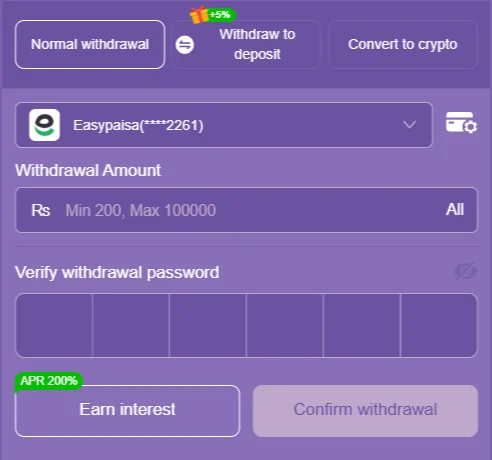
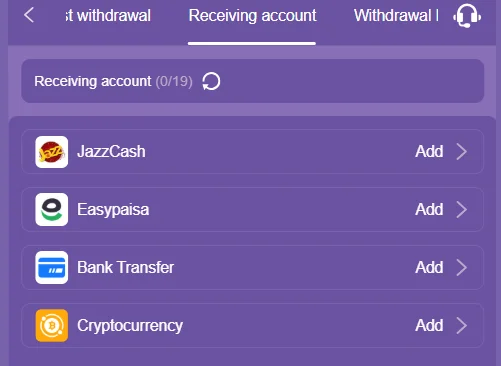
QZR888 Game Withdraw lets users transfer their available balance to their connected payment accounts. The QZR888 withdrawal screen displays JazzCash, Easypaisa, Bank Transfer, and Cryptocurrency as receiving account options. On the withdrawal interface, when Easypaisa is selected, the withdrawal amount field shows a minimum of Rs. 200 and a maximum of Rs. 100,000. To submit a withdrawal request, users must enter the amount along with their withdrawal password.
Important: Withdrawal limits, payment availability, verification requirements, and other conditions may change depending on the account, the payment method, or future platform updates. Always check the information currently displayed on your own QZR888 screen before withdrawing.
What Is QZR888 Game Withdraw?
QZR888 Game Withdraw is the section of the platform where users submit a request to transfer their available balance to a supported receiving account.
Based on the QZR888 withdrawal interface, users first add a receiving account. The available options include:
- JazzCash
- Easypaisa
- Bank Transfer
- Cryptocurrency
The withdrawal screen also shows a Normal Withdrawal option, along with Withdraw to Deposit and Convert to Crypto options.
QZR888 Game Withdraw Minimum and Maximum
On the QZR888 withdrawal screen, when Easypaisa is selected, the amount field shows:
- Minimum Withdrawal: Rs. 200
- Maximum Withdrawal: Rs. 100,000
This means that, under this displayed configuration, an amount below Rs. 200 cannot be entered, while the displayed maximum is Rs. 100,000.
QZR888 Withdrawal Limit
| Detail | Amount |
|---|---|
| Minimum withdrawal | Rs. 200 |
| Maximum withdrawal | Rs. 100,000 |
| Currency shown | PKR / Rs. |
| Example payment method | Easypaisa |
QZR888 Game Withdrawal Methods
The QZR888 receiving account section displays four payment categories.
1. JazzCash
Users can add their JazzCash account as a receiving account. Once linked, it can be selected during withdrawal to submit a request for the available amount.
2. Easypaisa
Easypaisa is available as a payment option on the QZR888 withdrawal interface. A masked Easypaisa account appears connected in the screen, and the withdrawal amount field shows a minimum of Rs. 200 and a maximum of Rs. 100,000.
3. Bank Transfer
Bank Transfer is also listed as a receiving account option on QZR888. After adding a bank account, it can be selected during withdrawal if the option is enabled for that account.
4. Cryptocurrency
Cryptocurrency also appears as an available option in the receiving account section. When using crypto withdrawal, it’s important to carefully verify the wallet and network details.
What to Check Before Withdrawing from QZR888 Game
Before submitting a withdrawal request, it helps to check a few basic points.
Check Your Available Balance
First, check the available balance in your QZR888 account. The withdrawal amount must be within your withdrawable balance.
Check Your Receiving Account
Confirm that your JazzCash, Easypaisa, bank account, or cryptocurrency wallet details are entered correctly.
Check the Minimum Amount
The QZR888 screen shows a minimum withdrawal of Rs. 200. If your balance is below Rs. 200, a request cannot be submitted under the displayed withdrawal field.
Keep Your Withdrawal Password Ready
The QZR888 withdrawal interface includes a “Verify withdrawal password” field. Make sure you remember your withdrawal password before confirming a withdrawal.
How to Withdraw Money from QZR888 Game?
Here are the basic steps for the QZR888 Game Withdraw process:
Step 1: Log In to Your QZR888 Account
Log in to your registered QZR888 account and open the dashboard.
Step 2: Open the Withdraw Section
Go to the wallet/withdrawal area of your account and select the Withdraw section.
Step 3: Select a Receiving Account
If a receiving account is already added, select it. If not, go to the Receiving Account section and add a supported option.
Step 4: Choose a Payment Method
Select a suitable method from the available options:
- JazzCash
- Easypaisa
- Bank Transfer
- Cryptocurrency
Step 5: Enter the Withdrawal Amount
Enter your withdrawal amount. On the QZR888 Easypaisa screen:
Minimum = Rs. 200 Maximum = Rs. 100,000
Step 6: Enter Your Withdrawal Password
Enter your withdrawal password in the Verify withdrawal password field.
Step 7: Confirm the Withdrawal
Double check the details and press the Confirm Withdrawal button.
After submitting the request, check the transaction status in the relevant section of your QZR888 account.
QZR888 Game Withdraw via Easypaisa
To withdraw via Easypaisa, your receiving account must be properly added on the QZR888 interface.
Steps:
- Log in to QZR888.
- Open the Withdraw section.
- Select your Easypaisa receiving account.
- Enter the withdrawal amount.
- Confirm the amount is within the allowed range.
- Enter your withdrawal password.
- Confirm the withdrawal request.
- Check the transaction status.
The Easypaisa account appears in a masked format on the screen, which helps protect account privacy.
QZR888 Game Withdraw via JazzCash
JazzCash also appears among QZR888’s receiving account options.
JazzCash withdrawal process:
- Open your QZR888 account.
- Go to the Withdraw section.
- Select your added JazzCash account.
- Enter the required withdrawal amount.
- Enter your withdrawal password.
- Verify the details.
- Confirm the request.
- Monitor the withdrawal status.
Tip: Carefully check your mobile number or account information when entering payment details. Incorrect information can cause withdrawal problems.
QZR888 Bank Transfer Withdrawal
Bank Transfer is also shown as an option in the QZR888 receiving account interface.
Before using bank transfer:
- Select the correct bank account.
- Verify the account information.
- Check the withdrawal amount.
- Review the applicable limits shown on the QZR888 screen.
- Enter your withdrawal password.
- Carefully review the details before confirming.
Exact processing times or limits for bank transfer should not be assumed without checking the current QZR888 interface.
QZR888 Cryptocurrency Withdrawal
Cryptocurrency is also available on the QZR888 receiving account page.
Crypto withdrawal involves wallet and network information rather than a traditional account number. Because of this:
- Select the correct cryptocurrency.
- Use the correct wallet address.
- Carefully check the network.
- Double check the address before confirming.
Important: An incorrect wallet address or wrong network can cause serious problems with cryptocurrency transactions.
What Is the QZR888 Withdrawal Password?
The QZR888 withdrawal screen has a separate “Verify withdrawal password” field. This may differ from your normal account login password, depending on how the account is configured.
The system requires withdrawal password verification when submitting a withdrawal request.
If you don’t remember your withdrawal password, check QZR888’s available account support or recovery options instead of repeatedly entering incorrect passwords.
What Is QZR888 Withdraw to Deposit?
The QZR888 withdrawal interface also displays a separate Withdraw to Deposit option.
This option may be handled differently from a normal withdrawal, so users should read the displayed instructions and applicable conditions before selecting it.
Avoid assuming that a normal withdrawal and a deposit related transfer automatically work the same way.
QZR888 Convert to Crypto Option
The withdrawal interface also shows a Convert to Crypto option.
This option appears to let users route a transaction through cryptocurrency. However, exact conversion rates, supported coins, networks, fees, and limits should not be treated as fixed unless they are clearly shown on the current QZR888 interface.
What to Do If a QZR888 Game Withdrawal Is Pending
If a withdrawal request doesn’t complete immediately, first check the transaction status.
Possible reasons include:
- Incorrect payment account information
- The request still being processed
- An account verification requirement
- The payment method being temporarily unavailable
- A platform side technical delay
- A transaction requiring review
What to Do
- Open your withdrawal history.
- Check the transaction status.
- Verify the entered payment details.
- Avoid repeatedly submitting duplicate withdrawal requests.
- If the problem continues, contact QZR888’s available support option.
What If a QZR888 Withdrawal Fails?
If a withdrawal fails, identify the reason rather than immediately retrying.
| Possible Problem | What to Check |
|---|---|
| Amount rejected | Check the minimum/maximum limit |
| Wrong payment details | Verify the receiving account information |
| Password error | Check the withdrawal password |
| Account issue | Check account status/verification |
| Technical problem | Retry later or contact support |
| Crypto issue | Verify the wallet address/network |
QZR888 Interest Feature and Withdrawal Conditions
The QZR888 interface also includes a separate Interest section with its own information.
The screen shows:
- APR 200%
- Settlement cycle: 1 hour
- Interest collection: real time
- Entry threshold: transfer amount ≥ 100
- A specific betting condition for interest
According to the displayed rules, withdrawing an interest reward requires meeting an effective betting requirement. The rules also indicate that the deposited principal and the collected interest may be treated under different conditions.
Because of this, users should not assume the interest feature is automatically equivalent to normal withdrawal balance. It’s best to read the interest related terms carefully before attempting a withdrawal.
QZR888 Withdrawal Safety Tips
Financial safety matters when using any real money platform.
1. Start With a Small Withdrawal
If you’re using a payment method for the first time, it’s better to first understand the available rules and transaction process.
2. Use the Correct Receiving Account
Verify every digit before submitting JazzCash, Easypaisa, bank, or crypto details.
3. Never Share Your Withdrawal Password
Don’t share your withdrawal password, login password, OTP, or other security credentials with anyone.
4. Keep Screenshots and Transaction Records
Keeping a record of the transaction ID/status after a withdrawal request can help with future troubleshooting.
5. Avoid Unverified Payment Links
Before transferring funds to a payment number or external link given by an unknown person, verify that it’s actually QZR888’s authorized process.
QZR888 Game Withdraw: Quick Facts
| Feature | QZR888 Information |
|---|---|
| Minimum displayed withdrawal | Rs. 200 |
| Maximum displayed withdrawal | Rs. 100,000 |
| JazzCash | Available in receiving accounts |
| Easypaisa | Available in receiving accounts |
| Bank Transfer | Available in receiving accounts |
| Cryptocurrency | Available in receiving accounts |
| Withdrawal password | Required on withdrawal screen |
| Normal Withdrawal | Available |
| Withdraw to Deposit | Displayed |
| Convert to Crypto | Displayed |
| Interest section | Available separately |
| Interest settlement cycle | 1 hour shown |
| Interest APR shown | 200% |
Accuracy note: Payment method specific limits, processing times, fees, and other conditions can change. The Rs. 200, Rs. 100,000 range above is based on the QZR888 withdrawal screen referenced for this guide, where payment mode was selected.
Conclusion
The QZR888 Game Withdraw section offers several receiving account choices, including JazzCash, Easypaisa, Bank Transfer, and Cryptocurrency. Based on the withdrawal screen referenced for this guide, the displayed withdrawal range is Rs. 200 to Rs. 100,000, and a withdrawal password is required to confirm a request. The interface also includes Normal Withdrawal, Withdraw to Deposit, and Convert to Crypto options.
For a smoother withdrawal experience, add the correct receiving account, check the currently displayed withdrawal limits, enter the correct amount, and verify your withdrawal password before confirming. Since payment rules and limits can change, always rely on the information currently shown inside your own QZR888 account rather than assuming an older guide has the latest limits. For more information stay connected with QZR888APP.